
Compressor and gate
Hardware strips include a combined compressor/gate. Set threshold and ratio to control mic peaks, then use the gate to mute keyboard and room noise between phrases.
Input strips
Each hardware strip maps to a physical device: USB mic, headset, interface line-in or onboard sound. Gain, mute, solo and bus buttons behave like a compact analog desk.
Software inputs use Voicemeeter Input (VAIO) virtual devices. Windows apps that play to Voicemeeter Input appear on a strip inside the mixer. Standard gives one VAIO. Banana adds a second (Voicemeeter Aux Input). Potato adds a third (Voicemeeter VAIO3).
Typical split: route games to VAIO, Discord to Aux, music or browser to VAIO3 on Potato so each source keeps its own fader and bus matrix.
Routing core
Bus A routes toward hardware outputs. A1 is the main out and sets the master sample rate for the whole engine. Additional A buses (A2, A3 on Banana and Potato) drive extra physical devices such as headphones beside speakers.
Bus B routes toward virtual outputs. Apps that record from Voicemeeter Output or Voicemeeter Aux Output receive whatever you send to B1 or B2. OBS, Discord, Zoom and DAWs read these paths without re-wiring cables.
Potato adds a multilayer mixbus: up to 8 input layers cross into 8 output layers for dense dual-PC and broadcast desks. See the comparison table below for exact counts per edition.
Driver stack
Voicemeeter installs virtual playback and recording endpoints. Apps pick them like any Windows audio device. Inside the mixer, the same signal path can be exposed through several driver models depending on latency needs and app compatibility.
Strip processing
Every input strip includes built-in tone and space tools before the fader hits the bus matrix.
Banana and Potato add extra FX on hardware strips (compressor, gate, limiter on Banana; parametric EQ, denoiser, C5 and more on Potato). Virtual input strips on Banana and Potato also carry a graphic EQ block.
Voicemeeter Banana
Hardware strips include a combined compressor/gate. Set threshold and ratio to control mic peaks, then use the gate to mute keyboard and room noise between phrases.
A brickwall-style limiter sits on each strip output so hot game or alert audio cannot clip the bus feeding your stream mix.
Record up to eight bus or insert sources to disk as MP3, WAV, BWF (Broadcast Wave Format) or AIFF. Useful for podcast multitrack or post-stream edits in a DAW.
Banana includes a chorus effect on eligible strips and expands to five inputs and five outputs with three hardware A buses and two virtual B buses. Standard is bundled inside the Banana installer.
Network audio
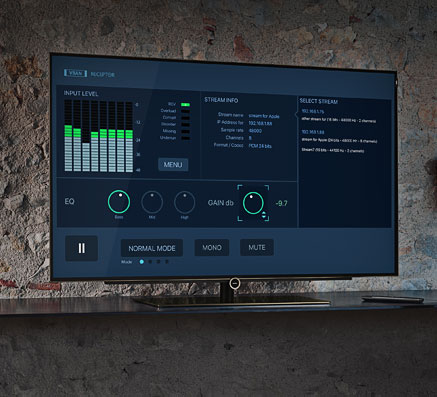
VB-Audio Network (VBAN) sends PCM audio over UDP on your LAN. Voicemeeter can transmit and receive multiple named streams without a physical cable between PCs.
Standard supports four incoming and four outgoing VBAN streams. Banana and Potato raise that to eight in and eight out. Assign a stream to a strip or bus, set the target IP or hostname, and align sample rate with the remote desk.
Common pattern: game PC sends gameplay VBAN to a stream PC running OBS, while the stream PC returns monitor mix or talkback on another stream. Configure streams from the VBAN menu in the title bar.
Automation surface
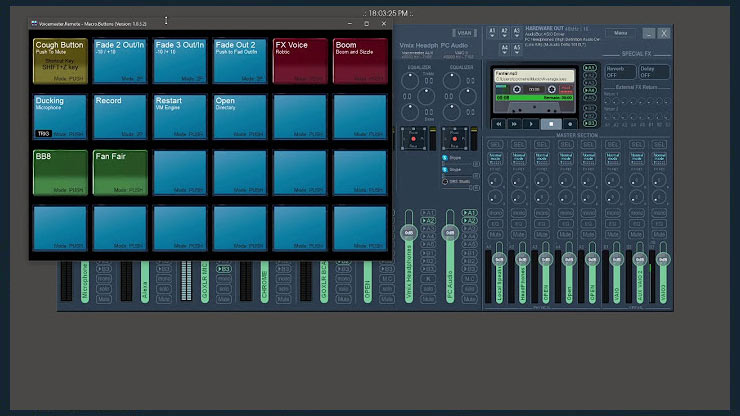
Macro Buttons is a companion app for programmable keys. Each button runs a script that toggles bus assignments, mutes strips, recalls presets, launches WAV clips or adjusts faders.
Streamers use it as a sound board: stingers, BRB beds and scene changes without alt-tabbing. Radio-style desks map cart buttons to jingles. Scripts use Voicemeeter's text API over UDP, so one click can change several parameters at once.
Macro Buttons ships with Banana and Potato packages. Pair it with the guides when you wire your first mute or preset recall.
Voicemeeter Potato
Potato targets heavier broadcast and production desks. It includes Standard and Banana capabilities and adds professional strip FX plus an 8-input by 8-output routing matrix with multilayer buses.
Edition matrix
Concrete I/O and feature counts from the current product line (versions 1.1.2.2, 2.1.2.2 and 3.1.2.2). Install the edition that matches your desk size; larger packages include the smaller ones.
| Feature | Standard | Banana | Potato |
|---|---|---|---|
| Total I/O | 3 in / 3 out | 5 in / 5 out | 8 in / 8 out |
| Hardware inputs | 2 | 3 | 5 |
| Software VAIO inputs | 1 (Voicemeeter Input) | 2 (Input + Aux) | 3 (Input + Aux + VAIO3) |
| Hardware A buses | A1, A2 | A1, A2, A3 | A1 through A5 |
| Virtual B buses | B1 | B1, B2 | B1 through B3 |
| Virtual driver APIs | WDM, KS, MME, DX, WaveRT, ASIO | Same stack, wider ASIO map | Same stack, full 8x8 ASIO |
| Strip FX | Intellipan, Color Panel EQ, Audibility | + Comp/gate, limiter, chorus; graphic EQ on VAIO | + PEQ, Denoiser, C5, JustVerb 3, send/return |
| VBAN streams | 4 in + 4 out | 8 in + 8 out | 8 in + 8 out |
| Multitrack recorder | No | 8-ch MP3, WAV, BWF, AIFF | 8-ch MP3, WAV, BWF, AIFF |
| Macro Buttons | Not included | Included | Included |
| Multilayer mixbus | No | No | 8x8 layers |
| Current version / size | 1.1.2.2 · ~21.9 MB | 2.1.2.2 · ~42 MB | 3.1.2.2 · ~71.6 MB |
Ready to install? Open the download console. Need help picking buses on day one? Start with routing basics or browse the full FAQ.
Next step
Standard for simple VOIP, Banana for streaming, Potato for multilayer broadcast routing.